Saturday, October 21, 2006

HND Graduation


Went to Pencoed College today for my HND Graduation Ceremony. I was surprised be the number of other courses also at the ceremony, there was HND's HNC's MBA's and PGCE's from University of Glamorgan, UWIN and UWIC.

Another surprising thing was that I was the only person from my course to actually turn up for the ceremony (obviously all turned off by the price of hiring robes) but their loss I guess. My parents we're very proud and will be even more proud for my big boys graduation next summer.

Monday, October 16, 2006

Sustainability

On November 29th 2006 The Green Awards For Creativity In Sustainability are being held at The London Guild Hall. The reason for these awards is to spotlight brands and organizations that have demonstrated their commitment to sustainable development in a creative and effective way using various marketing and media platforms.

The awards are open to all types of businesses in both the public and private sectors who are willing to nominate themselves. The event is supported by The United Nations Environment Programme(UNEP), Media Guardian, City of London, Marketing Week and CSR Wire.

"The overall objectives for the Green Awards are as follows:
  • To recognise and reward outstanding creative work that communicates sustainability.
  • To set the agenda for brands to brief agencies to include CSR within the creative process.
  • To create a forum for how the media can help solve some of the environmental issues in a creative way.
  • To develop the notion of 'Reform Advertising' i.e. advertising which includes environmental and social considerations during its planning and execution."
What they have to say about the reasons for the awards are “Today brands and organisations built on strong ethical and environmental credentials are becoming more influential across sectors as diverse as banking and retail, to food and pharmaceuticals. Marketeers and communications experts understand only too well the strong link between corporate reputation and customer trust, which in turn feeds through into brand strength and an organisations public positioning.

According to Mori, 82% of consumers want companies to make more effort to show what social, environmental and fair trade activities they are engaged in. The good news is that many businesses and corporations today see social and environmental issues as being critical to their overall success.”

The field that we work in ideally placed to encourage innovation in sustainable development, by
  • practicing greener lifestyles,
  • using energy efficient devices,
  • producing our own green energy via solar panels and wind turbines,
  • fitting in to our environment,
  • encouraging social interaction eg blogs,
  • recycling technologies,
  • producing less waste heavy and toxic products,
  • putting people first.

http://www.greenawards.co.uk/
http://www.csr.gov.uk/index.shtml
http://www.forumforthefuture.org.uk/

http://en.wikipedia.org/wiki/Sustainability
http://www.leeds.gov.uk/sustain/
http://environment.guardian.co.uk/columnist/story/0,,1924434,00.html
http://www.hydrogeneration.co.uk/intro.htm
http://www.greenpeace.org.uk/contentlookup.cfm?ucidparam=20060918141449
http://news.bbc.co.uk/1/hi/technology/4445060.stm#
http://news.bbc.co.uk/1/hi/world/africa/6040536.stm
http://laptop.org/

wireless networks review

Looked at bluejacking but simons software wasn't able to communicate properly with our phones.
pico net
The cloud wireless in jukeboxes
Use blimps or balloons to broadcast wireless networks
pringles can antenae
MESH AP


Sunday, October 15, 2006

Free, Open Wireless Networks

Seeing that I live in a small part (Rhoose Point) of a small village (Rhoose) on the edge of Cardiff (Rhoose) Wales Airport I thought I’d try to find out how many wireless networks there are in a this small rural area.

To start with I have a wireless network on NETGEAR shared between 2 laptops, which is open and free to use for anyone who wants to try.

Looking from home I found closed networks on BTVOYAGER a network called HORACE and one called SABAD. I then drove round the village with my laptop and found several networks - cxl-wifi, another BTVOYAGER, belkin54g, SABSW, NETGEAR, HILLNET, Livebox-2FAD, WANADOO-550D, linksy_nth, and at Cardiff Wales Airport BT Openzone.

Out of the above only 3 are open wireless networks free to use by anyone who finds them and the others are all secure. The exception to this is the network at the airport which uses BT Openzone. To use this you have to buy access time, walk into a hotspot, which could be a train station, café, shopping centre, restaurant/bar or airport open your wireless laptop or PDA, and connect to the internet using wireless broadband. Although not free to use it does give you access to thousands of public hotspots in the UK and tens of thousands global hotspots worldwide.

A completely free wireless network would allow people greater access to the internet no matter what their income and would create greater mobility of use for laptops and PDA’s.

http://en.wikipedia.org/wiki/Wi-Fi

http://media.guardian.co.uk/site/story/0,,1707753,00.html
http://www.nycwireless.net/articles
http://www.nytimes.com/2006/03/05/technology/05wireless.html?ex=1299214800&en=de3c127408552e0a&ei=5089
http://en.wikipedia.org/wiki/Warchalking
http://news.zdnet.co.uk/communications/wireless/0,39020348,39195421,00.htm

Wednesday, October 11, 2006

UCI - BRIEF THREE


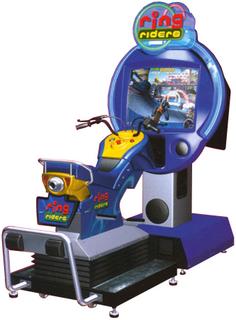
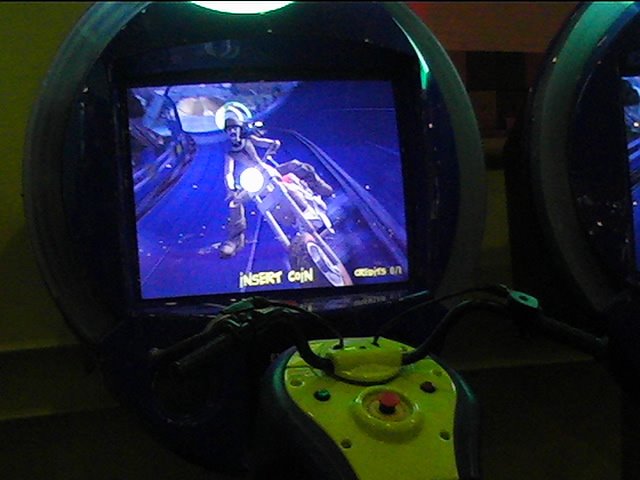
Ring Riders Arcade Game

To play Ring Riders you sit on replica motorbike shells, which move and tilt with the weight of the riders but doesn’t unlike other bike games offer much steering control. To steer you have to use the handlebars on the front of the replica, which also contains a throttle and brake control. During game play the interface is of a racetrack with different characters on bikes with your character at the back who’s movements are controlled by your movements on the replica bike.

In relation to HCI and usability I would say

• The user is attracted to the game by the motorbike shells, which get you more involved than by just using a joystick. And the fact that there are two bikes means you can interact not just with the computer but with one of your friends as well.
• In regards to health and safety the replicas are designed to move like real bikes but without the dangers of toppling or throwing the users to the floor.
• Before the actual game starts you choose from a range of difficulty levels linked to weather conditions and type of surface. So you can make the task easier or harder depending on your experience of the game.
• Your character gives you immediate feedback on screen as you steer and depending on if your using the throttle or brake, and the noises coming from the game link your actions to the action on screen. Bikes revving and crashes.
• I found the fact that you used the bikes movements less than on other bike games that I’ve played frustrating on my first go because I was bringing what I thought was prior knowledge to the game and getting less feedback than I’d expected.
• In terms of learnability and re-learnability, the instructions are easy to follow and given to you step by step. Once you’ve played it once you’ve unlikely to forget how to use it even after a few months.
• The game is effective in that your involved enough to believe that you’re on a bike racing other bikes round a track. Sitting on a replica adds a sense of reality to the whole experience.

The forms of interaction experienced playing the game are
• Instructing – you are shown instructions on how to use the controls on the replica to help you play the game.
• Manipulating – you can alter the environment (weather/track) and you can choose what you character looks like.
• Exploring – every lap you make helps you explore what the track looks like and where certain hazards might be.

The exhibits at UCI compared to those at Techniquest
• In terms of design they try to entice you and keep you forsaking all other games so that your addicted and spend all your money on that one game. Bur they both use shape and colour in similar ways, its just the time spent at one game or exhibit that differs.
• Are aimed at an over all older target audience, teenagers and young adults (or forever young adults). Especially some of the more gruesome graphic games.
• Are designed more to specifically entertain than educate.

arcadeflyers

Friday, October 06, 2006

Stars of CCTV

I decided to concentrate on the different ways you can get images and video onto sites on the web for public viewing and feedback reviews.

I looked at;

• YouTube – which allows anyone to watch and share original videos online.
• Flickr – which allows you to upload and share your photos online either by sending them over the web or via camera phone.
• GoogleVideo – which allows you to upload video, provided you own the necessary rights.

I signed up to all of the above and uploaded a video to YouTube and GoogleVideo and a picture to Flickr. All files uploaded without any problems but YouTube took the longest to load. In terms of getting your work seen by as many people as possible all 3 sites have their uses, you can even integrate the videos directly into blogs or websites and they are all free to use. There are literally millions of images and videos that have been shared worldwide.

I am interested in producing some film or animation work and in this regard I could find using YouTube and GoogleVideo and in some ways Flickr constructive in terms of getting the work seen be an audience with the power of rating my work after viewing it. People can rate the work out of 5 stars, leave a comment or email a link to the video to friends, family or colleagues. By reviewing the responses you can tell if your work is well received and worth marketing to a more profitable kind of mass media such as through TV production or pay per view download.

http://www.youtube.com/
https://upload.video.google.com/
http://www.flickr.com/
http://www.bbc.co.uk/wales/capturewales/
http://www.thetrailermash.com/

Thursday, October 05, 2006

TECHNIQUEST - BRIEF 1

Film/Music Mixer


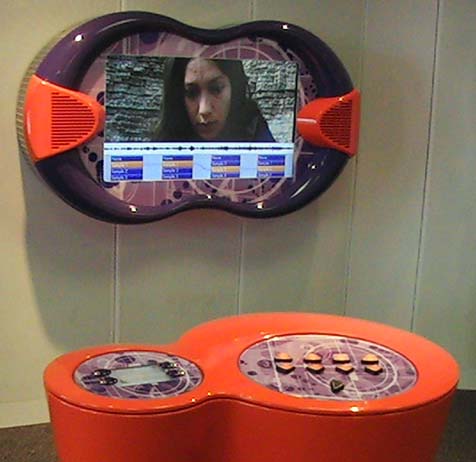
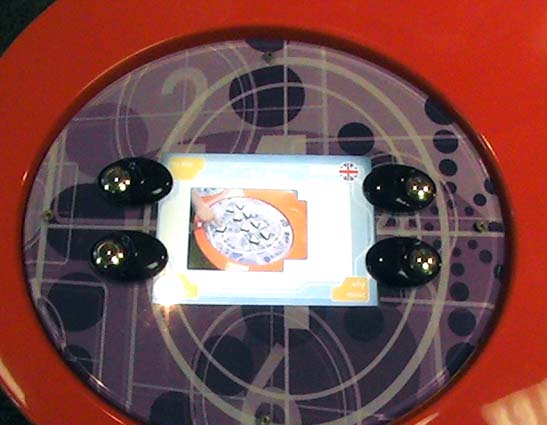
Once you approached the film/music mixer after being attracted to it by its big screen all you do is press the "try me" button on the top left of the left control panel. On pressing this you receive simple on screen instructions to "Press the play button to watch the film".

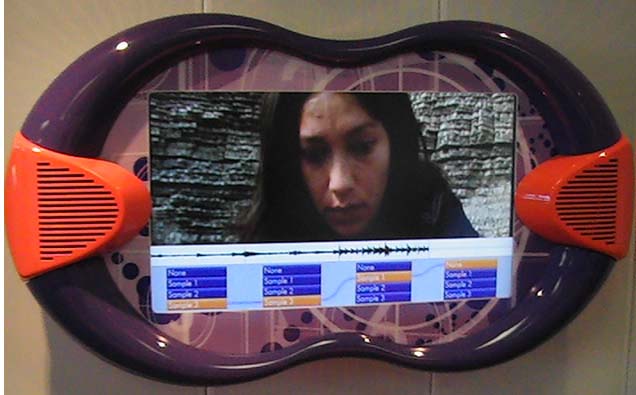
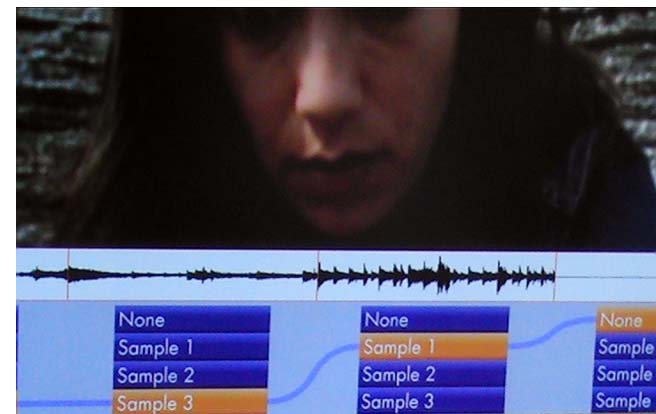
The play button is green and is place on the right-hand control panel. It looks like the standard play button that we’re used to on CD/DVD players. Once you’ve pressed it the movie starts to play on the LCD screen on the wall. As you watch it you can see the rate of play in the timeline and it also shows you the audio waveform of the music tracks that you can choose to play along to the video.

The main point of the exhibit is to get you to interact with what music is playing along with the video by using the 8 buttons above the play button. The video and audio is split up into 4 segments and by using 2 of the buttons that line up with that segment you can choose between having no music or a choose 1 of the 3 different music tracks in that particular segment.

The user learns how to use the exhibit after the initial instructions by trial and error. You press the buttons on the control panel above the play button and you get immediate visual feedback on screen (where you can see that the track has changed) and audio feedback (you hear a different music track or no music at all).

The target audience as with most of the exhibits on the top floor is older kids – teenagers and young adults. This has influenced the design in that instead of using bright primary colours to attract the user they’ve used orange and purple and a big screen. The interface on screen uses visual cues linked to the music that younger kids are unlikely to understand or appreciate fully, especially the audio waveforms.

The film/music mixer is fun to use, simple to learn (you get immediate visual and audio feedback after pressing a button) and it gives you an insight into how music video’s and film scores are put together which should appeal to the MTV/Ipod generation or whatever they’re called now.

In regards to HCI (human computer interaction) and usability I would say that it was

• Easy to learn and use.
• Memorable, in the fact that you wouldn’t have to relearn a difficult process
• Useful as a teaching and entertainment device
• Flexible, all in all you have 16 options of where you link the music or lack of music to the video.
• Efficient, you only have 4 states to choose from at a time in each of the 4 segments and the only mistake you can really make is not doing anything at all.
• Enjoyable to use and entertaining.
• Good to look at.

I think the exhibits lack of instruction bar “press the play button” encourages a general button bashing and self learning experimentation which aids interaction with the exhibit.

gogglevideo

Wednesday, October 04, 2006

Techniquest

Today we visited Techniquest to look at and interact with the exhibits they have on show there.

Tuesday, October 03, 2006

Design For Interaction 2

Interface Design and Usability

HCI - Human Computer Interaction
  • Design, evaluation and implementation
  • A bridging
  • Humans - Computers
Goals of HCI
A HCI approach aims to
  • Support
  • Extend
  • Optimisation
  • How ?
Multi Dimensional Nature of Usability
  • Learnability
  • Re-learnability Memorable
  • Utility
  • Flexability
  • Effeciency
  • Safety
  • Effectiveness
  • Usability Criteria
The User Experience
  • Feel
  • Satisfying
  • Aesthetically pleasing
  • Enjoyable
  • Fun
  • Entertaining
  • Motivating
  • Helpful/supportive
  • Rewarding
  • Emotionally Fullfilling
(Norman 1988)
(Nielsen 2001)
Usability principles useit.com nng.com

CCS Notes

notes for ccs taken by Kirsty

Chatted about what info we’d found out about peer-to –peer

Napster or a link – unstructured – p2p
Tapestry – structured p2p

Discreet (closed to outside world) networks for specialised areas
Another social network

History of internet – internet is simply inter networks –

How computer networks mirrored social net

6% of separation we’re all only 6 connections away from each other

Trace through address books 6 times to get to who you want

Hub
http://www.flickr.com/blog.gne?photo=258439096

Small world theory

The hub would be the most likely to know others in different groups

GOOGLE – searches Documents are most trustworthy if there are lots of links to them

Dark net (underground)

Nutella napster – issues behind them p2p – legal issues

List of companies of people are not happy with p2p
E.g. Sony, MGM

Copydex – underground movement – giving music away free
Embrace – play to enjoy music not to make money – hold secret gigs
Don’t believe in the copyright for music – just on name

Pre internet copyright movement

Music Industry

Producers (view) - people listening , merchandising, press & promotions,
How to get known
PureVolume – can lead to record deals
My space –

Distributors – charge – approx 50% of profits

Strategy of promotion
Merchandising
Maintaining brand of the band
Most of the revenue is through merchandising and live events
Self Distribution
Internet promotion
Pod casts
I Tunes 99p download
New bands have pop up of samples
Frattellis
Mass protest against record companies (people power)
Donate money to the band
Using the networks to promote
E.g. DJ’s / bands if you listen \ download a set and you like them you’ll be likely to pay to go and see there next gig/ dj set


Technical p2p
Social p2p
Cultural impact
Marketing – Significant word of mouth


In a peer 2peer networks if you can find the hub you can contact them for their contacts

If you want something rare important it is hard to get into the closed social networks
Spys undercove

Monday, October 02, 2006

PRODUCT ANALYSIS - BRIEF 2


Product Interface Interaction

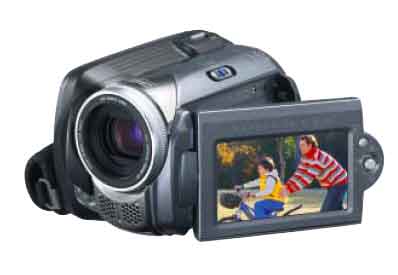
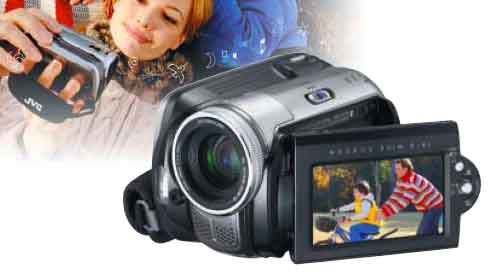
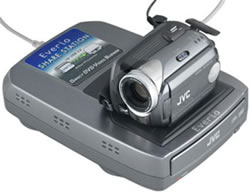
The product that I have chosen to review is JVC's GZ-MG26 Everio Hard Disk Camcorder. It is portable (handheld and compact), has a multimedia interface (display screen), and has some features that could be redesigned or features that could be introduced.

Description and Functionality

The product itself is a handheld digital camcorder with a built in 20GB hard drive. You can also be use it as a digital camera to take still images. It is built out of a strong black and gunmetal plastic (as are the buttons, knobs and levers) and the lens housing is made out of aluminium.
Shooting is simple. Just flip out the LCD monitor screen, select the camera or video mode and press the record button. All photos and video are stored on the large built-in 20 GB hard drive which can hold between 290 to 1500 minutes of video and up to 9999 still images depending on the compression rate and picture quality.

Judging by its online brochures it's intended users are families in there 20's and 30's who are computer literate and willing to learn simple editing software to produce their own DVDs.

Apart from taking video and stills you can use the camcorder to view these image in its LCD screen or hook it up to a TV monitor or via saving them to a PC. You can re-order the scenes or delete them and add special effects to the playback of the video.

Concerning the environment within which it can be used its mainly designed for daylight conditions but it does contain a white LED and a night scope for darker conditions. You can also buy tripods, flashguns and a marine case for under water shooting up to 30 metres.

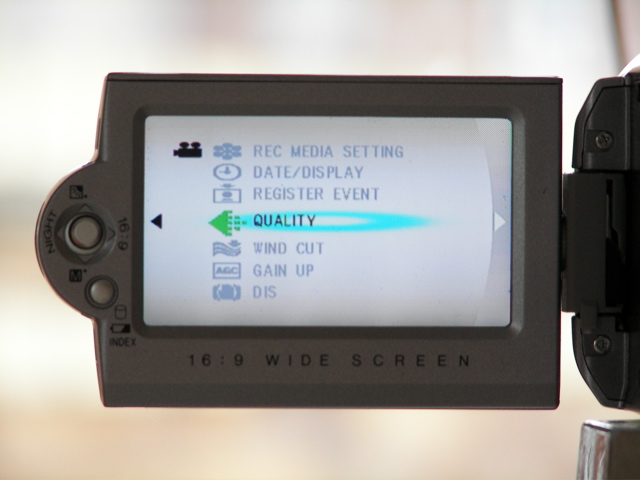
To access the functions of the device you mainly use the menu button, the index button and the control lever to move around the display and interact with the onscreen interface menus. In terms of multimedia you can view what you have recorded on TV, copy it to PC to edit fully from there, or you can burn DVD’s directly onto a “share station DVD burner” and view the footage on any device that plays DVD’s.

Interface Design

The interfaces look and feel is typical of most camcorders with various symbols, battery levels and other information on top of the footage on screen. But when you press the main menu button the interface is more like a mobile phone menu with animated icons next to text descriptions. Even the control lever, which you use to navigate up, down and left, right through the on screen options is reminiscent of the joystick controls on many mobile phones, especially Sony Ericsson models.

In play mode as opposed to the record mode the interface splits the screen up into 9 rectangles, each one containing a snapshot of the first frame of a video or a photo. If you have more than 9 videos/photos stored on the camcorder a scrollbar appears on the far right showing that you that you can scroll down onto further content. Using the control lever you can view full screen photos or play full screen videos. You can also pause, scan and zoom into the videos and photos using the control lever and the interface.

The interface is easy to use but when using the menu functions you really need to have the users manual to hand to know where to look for relevant functions and what they do. Using trial and error here would just lead to a lot of errors and you would lose track of where you’ve been. When in play mode, since its all visual you can instantly see where you are and what videos/photos are only one click away. This instant feedback is more user friendly and invites more trial and error interaction because your only one click back to its main interface so its hard to go wrong and lose yourself.

In terms of human cognitive processes I would say that the interface
• grabs your attention with its use of animated icons.
• in terms of perception uses easily distinguishable icons but not all of them have obvious representation.
• in terms of memory and learning has some actions in common with other camcorders which aids the learning experience if you have prior knowledge to bring to the device but would be difficult to master if you didn’t have a user manual to refer to.

Task Analysis
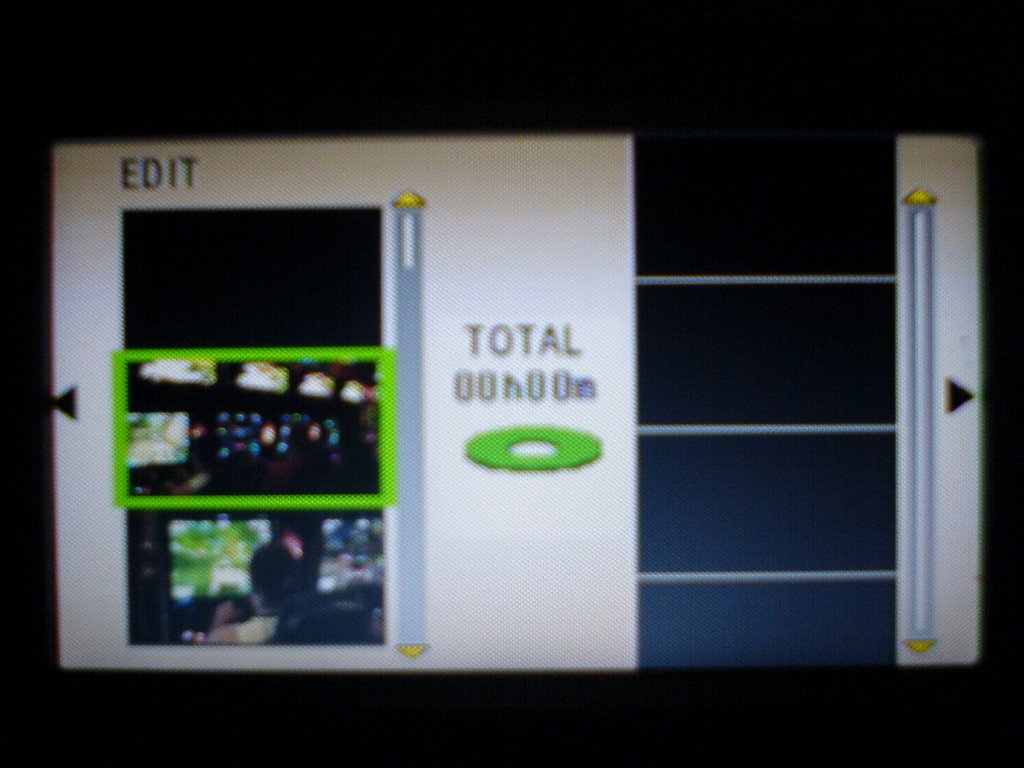
The online brouchures mention that you can perform simple editing in camera, so this is the task I’ll try to analyse. First of all you have to create a playlist which will enable you to organise recorded video in order of preference. To do this you select the power switch to the play mode; set the mode switch to video; press the menu button; then select the “playlists contents” option on screen; choose “NEW LIST”; then select a file from the scenes you have saved on the camcorder to add to the playlist; when using multiple files in the playlist you can choose the exact order you want the scenes to run or delete unwanted files; when you’ve finished your playlist, save and quit. To play the playlist when in the “playlist contents” screen select your required playlist and use the toggle switch to play/pause or stop the scene.

To perform this task you definitely need to have the users manual to hand (which is 70 pages long and printed in black and white). But once your on the editing screen you’ll find the interface is really easy to use. The left of the screen has all the scenes on the disc, which you can scroll through and the right of the screen is where you place the scenes that you have chosen in the order that you want them.


Contempory Contextual Studies 2

Kirsty took notes of this session and Simon recorded it to put on a podcast. We talked about what we'd found out about P2P networks.
6 degrees of seperation, we are only 6 steps away from knowing each other-Small world theory.
Next blog to be on : Stars of CCTV

www.ubermatic.org/life/

Thursday, September 28, 2006

P2P File Sharing

P2P
Peer to peer (P2P) software allows the sharing of files between computer users. Files can be shared between users without the hassle of having to email them.
One of the earliest P2P file sharing systems was Napster. Users connected to one of a many servers from which they could obtain files, which had been made available by the other users.

The latest generation of P2P "systems" (e.g. Grokster, Streamcast, KaZaA) are far less centralized Napster was. There are no centralized servers; rather users download software (normally free), which effectively turns each user's computer into its own separate Internet server, creating a totally decentralized system.

P2P on Kazaa

Kazaa uses P2Ptechnology. This means that individual users connect to each other directly, without need for a central point of management.

All you need to do is install Kazaa and it will connect you to other Kazaa users.

Overview of the legal issues.


Loosely speaking, you are not infringing copyright by just using P2P software. This is because the software is, in most cases, made available freely by the owners of copyright in circumstances giving rise to an implied license. Of course, if this is not the case then the mere use of the software without license may infringe copyright.
Nor will the use of P2P to share files involve a copyright infringement where the owner of copyright in the material being shared has consented to this.
In our case (me, lecturers and my peers) we may use P2P to share our work (these blogs) in order that others can provide critical comment and evaluation.
It is the use of P2P to share or trade copyright works without the consent or license of the copyright owner that has the potential to give rise to an action for infringement of copyright.

http://www.grokster.com/
http://www.kazaa.com/us/index.htm
http://www.streamcastnetworks.com/FullPress-vs.html
http://en.wikipedia.org/wiki/Grokster
http://en.wikipedia.org/wiki/Peer-to-peer
http://news.bbc.co.uk/1/hi/programmes/click_online/4104827.stm
http://www.bbc.co.uk/imp/

Wednesday, September 27, 2006

Alumni Presentations

Today we were visited by Steve Woollard and Carol Wilkins who graduated in the summer from this course. Steve gave a presentation on tourist lacative media and Carol talked through some of her work from last year.
www.versiontwopointzero.com
www.mobilebristol.com
www.createascape.org.uk

Tuesday, September 26, 2006

Design For Interaction 1

Groups looked at interaction with apple macs, photocopyers, and nokia 8210.
Briefs were given out for us to look at. Trip to techniquest, product interface interaction, trip to UCI. Break down of marking is brief 1 blog report 15%, brief 2 blog report 20%, brief 3 blog report 15%, and brief 4 presentation 10%

Take camcorder in tomorrow for brief 2 Product Interface Interaction

Debbie Lamont
dlamont@uwic.ac.uk

Contempory Contextual Studies 1

Start of a new course having previously been on a HND in Bridgend and already a day behind with my blog (this is the entry for yesterday). Simon talked about peer to peer networks, copyright-creative commons, located media (google earth), sustainable development.
Report on various assignments are going to be in the form of online blogs like this one.
Journal - 1. Identify - Examples
2. Describe -URLs/Source
3. Analysis - grouping
4. Evaluation - Criteria -(you, other/society, field of interactive media)
www.charade.org.uk
creativearchive
spope@uwic.ac.uk

Saturday, September 23, 2006

Hello and welcome

Hello and welcome to my Blog